
Egg Evolution Controls
How to move, look, and hit merge or hatch prompts on PC and mobile — without invented hotkeys.
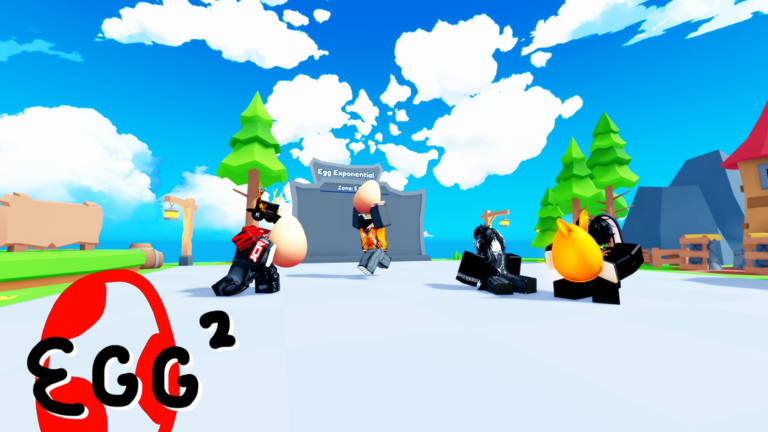
Egg Evolution does not publish a custom keybind sheet. It is a Roblox incremental: you walk, you look, you accept on-screen prompts. This page records that honestly. If another wiki lists F to merge, Q to hatch, or a secret emote that skips Forest, it is guessing or copying a different egg game.
The loop on the storefront is still merge, hatch, then rebirth. Controls only get you to those prompts. They do not skip badges.
What the listing actually says
The Roblox page tells you to merge eggs, hatch companion pets, rebirth, and buy upgrades. It tells you to play with friends or alone. It does not name a key. Server size is six. Voice chat and camera are off. Avatar type is R15. That is the entire official input story.
Official screenshots show players carrying eggs in their arms on a plaza in front of an Egg Exponential sign. Your egg is a held object. Walk with it. Do not drop it in a full lobby to “test physics.”
PC defaults (Roblox client)
Until Kingerman Creations ships a custom bind menu — they have not advertised one — use Roblox defaults:
- WASD — move.
- Space — jump.
- Mouse drag — camera. Right-click drag is the usual look bind; scroll zooms.
- Shift — sprint if the experience leaves Roblox sprint on. If it feels locked, the game disabled it.
- Click / E — accept a ProximityPrompt. Merge pads and hatch stations in this genre almost always use that pattern. Watch the on-screen billboard, not a guessed letter.
- Esc — Roblox menu. Codes and shops are in-experience buttons, not Esc.
If a prompt shows a different key, trust the prompt. This wiki will not override a live billboard.
Mobile and tablet
- Left thumbstick to walk.
- Jump button on the right.
- Drag the right side of the screen to look.
- Tap the prompt when you stand on the pad.
- Rotate to landscape if the HUD crowds the merge text.
Touch players should stand still before tapping merge. A drifting stick is the usual reason a pair fails to register. The getting started hour assumes you can hold still for two seconds.
Console
Roblox on console uses the platform stick and face-button confirm. There is no Egg Evolution-specific controller overlay in the listing. If you are on a gamepad, treat the on-screen prompt as the bind.
How merge input actually feels
You carry an egg. You walk to another matching egg or a merge station. A prompt appears. You accept. The shell level should rise — promo art even stamps Level 1 versus Level 100. If nothing happens, you are not on a pair, you are in a stale server, or you already spent that egg on a hatch. Rejoin after the 16 November 2026 update if the pad is silent.
Do not mash. Incrementals that count toward 500 / 1,000 / 2,500 Eggs usually debounce. One clean accept is better than twenty clicks that never award the 500 Eggs badge.
Hatch prompts
Hatching is a spend. Official art shows a dog-like pet in a spotted egg and a chick leaving a beige shell. Stand at the hatch UI, confirm you can spare that egg, then accept. A friend cannot tap it for you. Details sit on the hatch guide and the pets hub.
Camera, HUD, and the Egg Exponential sign
The sign is the only published zone label we can see in official media. Point the camera at it after a gate. If the zone line did not change, you are still in Forest even if a friend ran ahead. Six-player servers make that mistake common; see co-op.
Zoom out far enough to see other carried eggs. Zoom in to read shop text before you dump RELEASE Gems into the first glowing button. The Market update added potions — those rows are easy to mis-tap on mobile.
What we will not list
- A full WASD overlay image with invented icons.
- Auto-hotkey macros. Those belong, if anywhere, on the scripts hub, which currently has no dedicated public script for this place.
- “Press R to rebirth.” Rebirth is a shop or pad action described in the rebirth guide, not a confirmed single key.
Accessibility notes
Roblox’s own accessibility settings (reduce motion, camera sensitivity, shift lock) apply. This experience does not advertise a colorblind mode or remappable merge key. If you cannot read the prompt, increase UI scale in the Roblox menu, then stand closer to the pad.
Shift lock can help you line up two eggs on PC. It can also make the camera fight you on a crowded six-player pad. Toggle it per session.
First-session bind check
- Join Egg Evolution.
- Walk a circle around the plaza without dropping the starter egg.
- Look at the Egg Exponential sign so you know the camera bind.
- Trigger one merge prompt and one UI open (shop or codes).
- Redeem RELEASE from the codes list before you spend Gems.
- Open the merge checklist on a second screen so you are not guessing whether Forest awarded.
If those six steps work, you have the whole control scheme this game has published. Everything after that is economy, not input.
Frequently Asked Questions
Quick answers to the most common Egg Evolution questions.
What is the merge key in Egg Evolution?
There is no published custom key. Walk to the pad and accept the on-screen prompt (usually click or E on PC, tap on mobile).
Can I remap controls?
The listing does not advertise a custom bind menu. Use Roblox defaults and trust the live prompt.
Does the game support gamepad?
Roblox consoles use standard stick plus confirm. Egg Evolution has not published a unique overlay.
Why did my merge not count?
You may not have had a pair, you may have hatched that egg, or the server is stale. Rejoin and accept the prompt once. See how to merge.